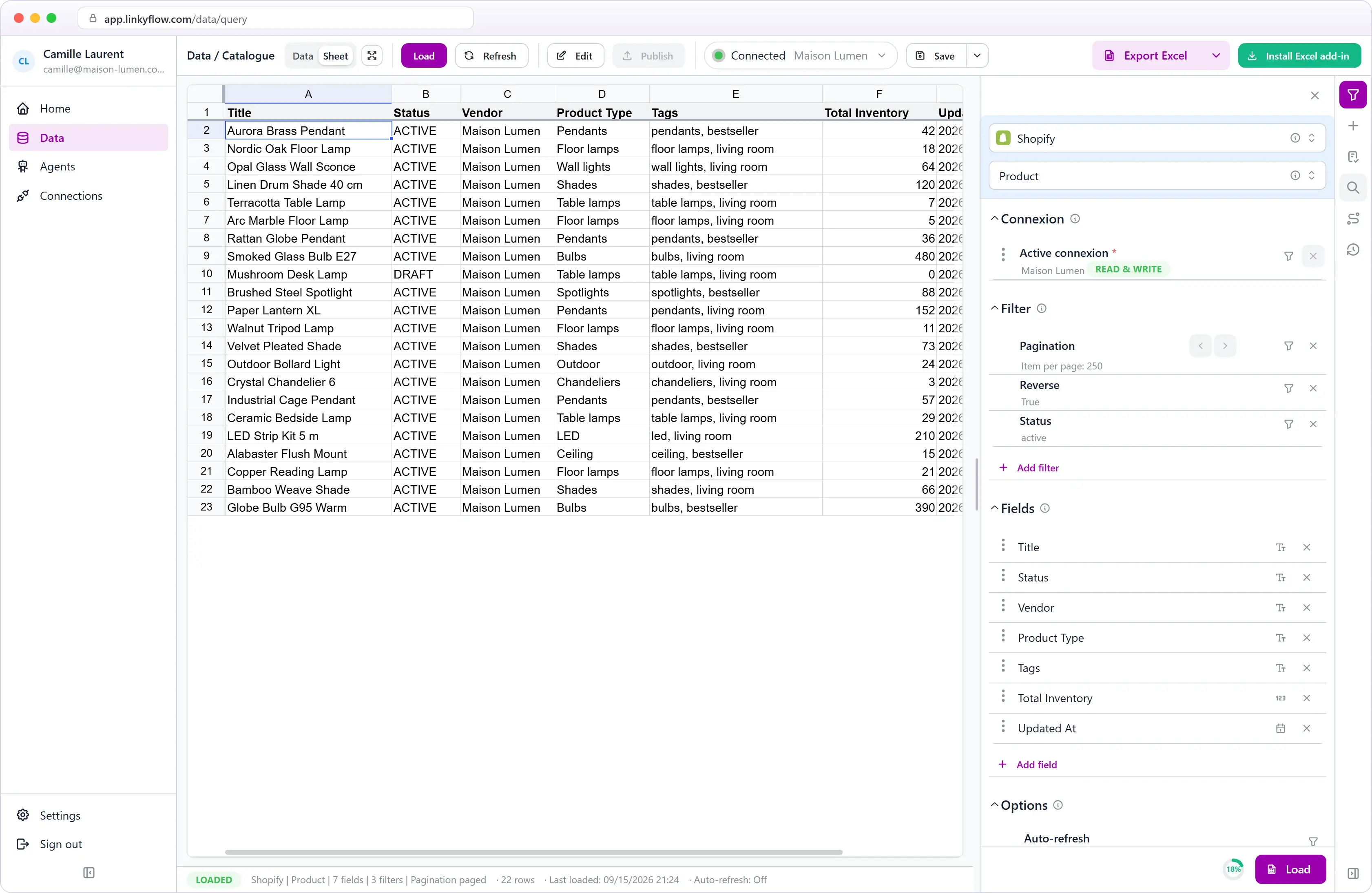
Your classic Excel.
Made dynamic. And it acts.
LinkyFlow plugs Excel into your platforms — Binance, Coinbase, Shopify, WooCommerce, eBay, Stripe. Your data streams into the active cell in real time, and your sheet can act back: place an order, update a product, publish changes.
CONNECT YOUR TOOLS — ONE INTERFACE, MULTIPLE WORLDS
THE QUERY BUILDER
Build your query. Not a formula.
The LinkyFlow taskpane opens inside Excel. You pick the source, what you want to fetch, filters and columns — click Load, and a live table, connected to the platform, appears in your sheet.
Pick your source
Binance, Coinbase, Shopify, or any available integration. The taskpane knows what to offer for each.
Ask your question
"Active products", "orders from the last 30 days", "all wallet balances". A Query = a business intent, not an API URL.
Filter & select columns
Pagination, sort, status, dates — add filters. Pick exactly the columns you want in Excel.
Click Load →
The table appears in the active cell, ready for pivots, charts and formulas. One-click refresh.
TWO WORLDS, ONE INTERFACE
Crypto. E-commerce. And more.
You don't need one app for your portfolio, another for your store. One interface, multiple worlds — everything in the same sheet.
LINKYFLOW · CRYPTO
Your exchanges in the sheet.
Portfolio tracking, FIFO P&L, allocation dashboards, tax reporting — all from Excel, across 9 exchanges in parallel.
Consolidated portfolio: Binance, Coinbase, OKX, Bybit…
Transaction history + cost basis
Order books, live prices, OHLCV for backtests
Trading from Excel (trade API key enabled)
9 exchanges
SHOPFLOW · E-COMMERCE
Your Shopify store in formulas.
Products, variants, orders, customers, inventory — all Shopify resources exposed as simple queries. And editable: change the cell, publish to the store.
Product catalog with columns of your choice
Filterable orders: date, status, source
Update products and prices from the sheet
Monthly accounting report without CSV export
+ more e-commerce integrations coming
ON THE ROADMAP
WHAT LINKYFLOW GIVES YOU
Excel that reads. Excel that acts.
We don't invent a new tool. We take the classic Excel you already master and make it dynamic: live data from your platforms flows into your cells, and your actions flow back to them.
01 · LIVE DATA
Live data, in the cell
Crypto prices, exchange balances, Shopify products, orders — each resource becomes a dynamic Excel table that updates itself, in real time.
02 · NO-CODE
Visual query builder
Provider, query, filters, columns — point and click. No API docs to read, no formulas to memorize.
03 · ACTIONS
Your sheet acts on your platforms
Excel is no longer read-only: place a crypto order, update a product or a price, publish your changes — from the cell, with =LFS.… formulas or scheduled refresh.
WHY EXCEL?
Not another app. The tool you already master.
Portfolio apps, Shopify dashboards, reporting tools all want you to adopt their logic. Excel adopts yours.
1.1 Bn
Excel users worldwide — the largest calculation surface ever created.
0 files
to export, re-import, reformat. Your data is in the cell when you want it.
∞ workflows
VBA, Power Query, Power Pivot, Office Scripts — keep everything you already know.
3 STEPS · 90 SECONDS
From zero to first dashboard.
No painful sign-up. No SDK. No webhook. Install, paste a key, load a query.
STEP 01
~15 s
Install the add-in
Microsoft AppSource or the "Install for Excel" button — works on Desktop & Web.
STEP 02
~45 s
Connect your source
Exchange API key (read-only by default — enable actions whenever you want), Shopify domain + token. The wizard guides you step by step.
STEP 03
~30 s
Load your first table
Pick your query in the builder, add filters and columns, click Load. That's it.
PRICING
Start free. Scale when you need it.
No commitment. Start with market data, activate trading when you want.
Free
Start with refreshable exchange data inside Excel.
0€
per month
Access to crypto exchange market data
Market data refresh every 5 minutes
Access to 1 user wallet
Create SPOT orders up to 200€ per month for 1 user wallet/exchange
Premium
Faster refreshes and more wallets for active spreadsheet workflows.
9.99€
per month
Access to crypto exchange market data
Market data refresh every 10 seconds
Access to 5 user wallets
Create SPOT orders up to 10,000€ per month across different wallets
Pro
Real-time market data and higher limits for teams that run Excel as an operations workspace.
Access to crypto exchange market data
Real-time market data (websocket)
Unlimited wallets
Create SPOT orders up to 500,000€ per month
Frequently asked questions.
What is LinkyFlow?
LinkyFlow is a Microsoft Excel add-in that turns a classic spreadsheet into a dynamic workspace. It streams real-time data from your platforms — Binance, Coinbase, Shopify, WooCommerce, eBay, Stripe — straight into your cells, and lets you perform actions from Excel: place a crypto order, update a product or a price, publish changes back to your store.
Which platforms are already supported?
Nine crypto exchanges (Binance, Coinbase, OKX, Bybit, HTX, Bitget, Gate.io, MEXC, Upbit), Shopify, WooCommerce, eBay and Stripe. Wix, PayPal, BigCommerce and more are on the 2026 roadmap.
Can Excel really perform actions, not just read data?
Yes. With LinkyFlow, Excel becomes two-way: besides reading live data, your sheet can place an order on an exchange (=LFS.BUY, =LFS.SELL), edit e-commerce products, prices and inventory, then publish those changes back to the platform in one click.
Are my API keys / tokens safe?
Yes. By default you connect read-only credentials: LinkyFlow then cannot modify anything or trigger withdrawals. Actions (trading, product updates) only work if you explicitly enable the corresponding permissions on your platform. Secrets are encrypted server-side and never seen in plain text.
Does it work on Excel Mac and Excel Web?
Yes. Any add-in through AppSource is cross-platform: Windows, macOS, iPad, Excel for the web. The taskpane and functions are identical.
Can I cross-reference crypto and Shopify data in the same sheet?
Yes — that's actually why we built it. Load your Binance query in one tab, your Shopify query in another, and cross them with any Excel formula.
Can I automate advanced workflows?
Yes — via =LFS.… syntax, by combining formulas with Office Scripts, or with VBA. Scheduled refresh re-runs your queries automatically, and your formulas can trigger actions.
Your next sheet fills itself. And acts.
Install LinkyFlow for free, connect a source, and watch your Excel turn dynamic in under 90 seconds: real-time data in your cells, actions back to your platforms.