
Add LinkyFlow to ChatGPT
What it does: LinkyFlow is an MCP server, at https://mcp.linkyflow.com/mcp. Added to ChatGPT as a plugin, it lets ChatGPT read the stores, payments and accounts you connected in LinkyFlow, through your LinkyFlow account and with your consent. ChatGPT never sees a password or an API key: it signs in to LinkyFlow, and LinkyFlow uses your connections for it.
Before you start:
- A LinkyFlow account with at least one connection (Install LinkyFlow, then add your store from Connections). - A ChatGPT plan that lets you add a custom MCP server to your plugins.
Add the plugin
- In ChatGPT, open Plugins from the side bar, then click Add (top right) and choose Add a custom MCP server. 2. Fill in the form:
- Name: LinkyFlow
- Description (optional): what you will use it for
- Connection: Server URL,
https://mcp.linkyflow.com/mcp - Authentication: OAuth. Leave the advanced OAuth settings as ChatGPT detects them.
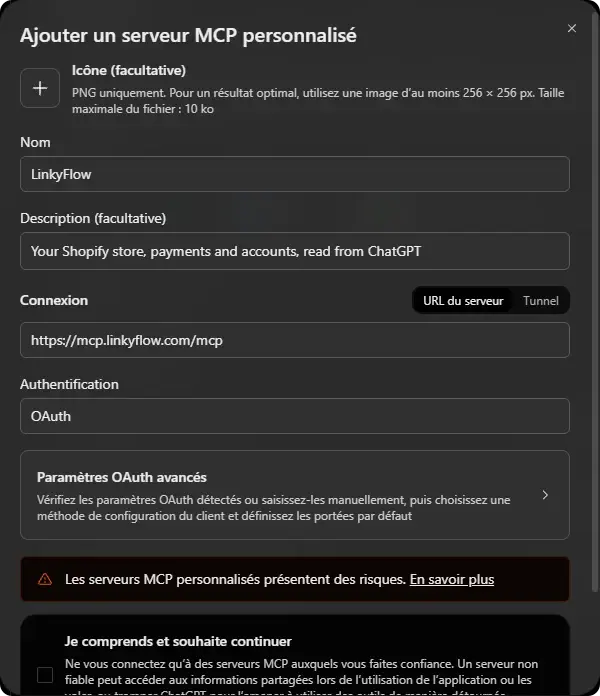 3. Read ChatGPT's warning about custom MCP servers, tick the box that you understand, and click Create as plugin.
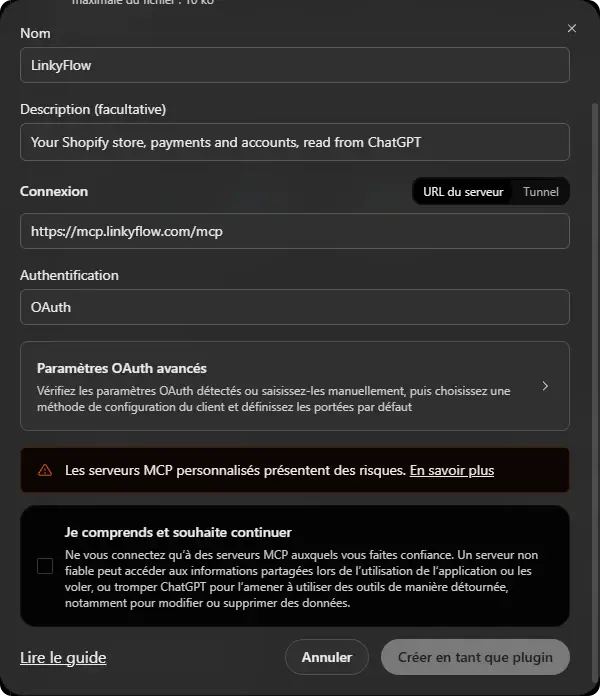 4. ChatGPT sends you to LinkyFlow: sign in and allow the access it asks for. Back in ChatGPT, LinkyFlow is listed in your plugins.
Use it in a conversation
In a new conversation, open the + menu of the message box and choose LinkyFlow, then ask your question in your own words: "which active products have 60 units or more in stock?", "which orders used the code BLACKFRIDAY?". ChatGPT picks the connection and the reads it needs, and says what it checked.
What ChatGPT does, and what stays in the sheet
- ChatGPT reads and analyses: products, stock, orders, customers, payments, discounts. - Changes made in bulk, checked line by line, stay in the LinkyFlow sheet (Excel or the web app), where each change is listed before Publish. A good split: ask ChatGPT, apply in the sheet. See Plan a Shopify Black Friday with ChatGPT and Excel.
Settings and updates
- Permissions: in ChatGPT, Plugins → LinkyFlow sets when ChatGPT asks you before using one of its tools. - After a LinkyFlow update: if a tool looks out of date, open Plugins → LinkyFlow, click Refresh tools, then start a new conversation. - Other assistants: any client that supports remote MCP servers with OAuth uses the same URL.